AS Notes brings markdown and [[wikilink]] editing for notes, documentation, blogs and wikis directly into VS Code and compatible editors (e.g. Antigravity, Cursor, Windsurf).
Capture ideas, link concepts, write, and stay focused - without ever leaving your editor.
- Markdown Notes
- Wikilinks & Backlinks
- Tasks
- Kanban Board
- Daily Journal
- Outliner Mode
- Mermaid & LaTeX Rendering
- Encrypted Notes
- KeePass Database Client
- Static Site Publishing
- Git / Version Control Friendly
Download / Install From:
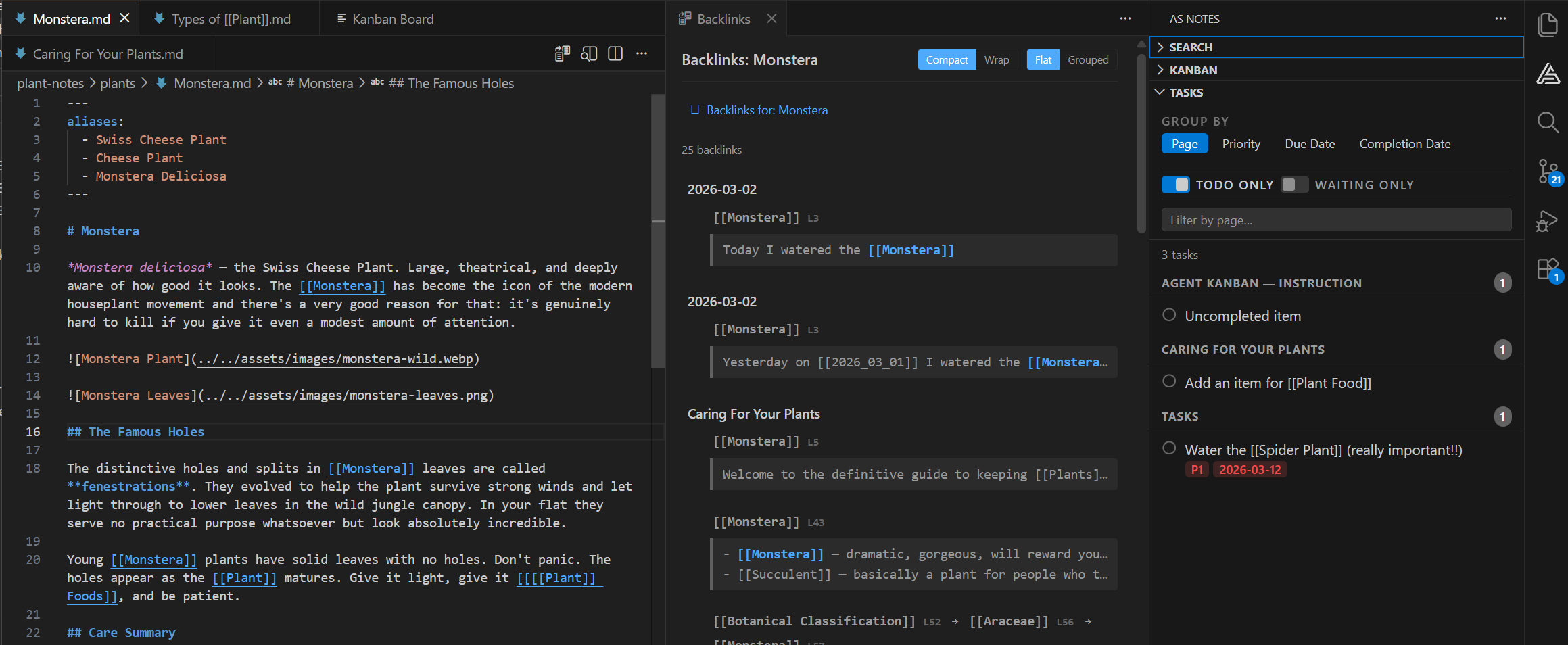
Capture and organise information fast, all without leaving your favourite editor
Wikilinks
Link notes by name using [[double bracket]] syntax. Jump between related notes instantly.
Stay in VS Code
No app switching. Notes live alongside your project files in the familiar file tree.
Pro Editor Features
Advanced formatting, backlinks, graph view, and more with a one-time Pro licence.
Note-taking built to work where you work
Most note-taking tools pull you out of your editor. AS Notes keeps you in it — so your ideas, references, and tasks live right next to the code they relate to.
Use the editor you love
VS Code and forked editors (Antigravity, Cursor, Windsurf etc) loved and trusted by millions. It's fast and extensible, meaning that you can take advantage of VS Code's rich ecosystem along side the productivity tools that AS Notes brings.
Link ideas with wikilinks
Type [[ and start connecting. Wikilinks let you reference any note by name, building a web of related concepts that grows with your thinking. Backlinks show you every page that links to the current one, so you always know where an idea fits.
Daily workflow: Journals, Tasks and Kanban Board
Track what needs doing with inline task tags: priorities, due dates, and waiting states, all inside your notes. Start each day with a journal entry that links to ongoing work. No separate project management tool required for the day-to-day.
Plain Markdown + Wikilinks. No lock-in.
Every note is a standard .md file. No proprietary database, no opaque sync format. Your knowledge base works with grep, ripgrep, and any tool that reads text files. If you ever move on, your notes come with you, unchanged.
Keep your notes next to your code
Switching to a separate app means losing context and scattering information across tools that don't talk to each other. AS Notes supports notes inside your codebase, so they sit alongside your project files in the VS Code editor you already know.
Shortcuts and tools help you capture information faster
Type / to access shortcuts and tools to help you capture, organise and format information faster. Spend more time thinking about the subject, and less about the notes.
Structure your thinking with Outliner mode
Switch on Outliner mode and your bullets behave like an outliner should. Tab and Shift+Tab indent and outdent, Enter continues the list, and backspace merges lines cleanly. Restructure an idea without ever reaching for the mouse.
Diagrams and equations, rendered inline
Write a mermaid code fence and watch it become a flowchart. Wrap maths in $$ and see it typeset as you type. Architecture sketches and formulae live in the note itself, as plain text you can still diff.
Encrypt the notes that matter
Lock any note, or your whole vault, with AES-256-GCM encryption and Argon2id key derivation. Encrypted notes stay encrypted on disk and in your backups, so a synced folder or a stolen laptop doesn't become a data breach.
Your passwords, beside your notes
Open an existing KeePass .kdbx database inside the editor. Unlock with a password and optional key file, then browse, search and add entries without breaking flow. Your database stays on your machine: no cloud vault, no account required.
Publish your notes as a static site
Turn a folder of Markdown into a browsable HTML site with one command. Wikilinks become real links and your structure carries across, so the same notes serve as a personal wiki, a team handbook, or a public blog. Host it anywhere that serves files.
Version your knowledge like code
Because every note is plain text, Git just works. Diff a change to your thinking, branch an idea before committing to it, review notes in a pull request, and use blame to find out when, and why, you changed your mind.
Ready to write better notes?
Install AS Notes from the VS Code Marketplace and start with the free tier today.
Questions? Contact us